Run a ROMS-MARBL Blueprint with C-star CLI#
Prerequisities#
In order to run this notebook, you will first need to:
Install
C-StarActivate the environment in your terminal with
conda activate cstar_envIf you want to run this example notebook, first create an
ipykernelby running this command in your terminal:python -m ipykernel install --user --name cstar_env --display-name cstar_envLaunch this notebook from your terminal with
jupyter lab docs/tutorials/tutorial_bp.ipynband selected thecstar_envin the kernel dropdown within the notebook.
Note
This short example is runnable on a MacOS laptop with the default C-Star configuration settings. If you run this example or another use case on an HPC, please visit the configuration to learn how to integrate C-Star with SLURM and configure other important behaviors.
To run the ROMS-MARBL application, the following files first need to be created specifically for the simulation you’d like to run:
Input data files (e.g. surface and boundary conditions, initial conditions, grid definitions, etc., typically as
.ncfiles)Compile-time files (
.opt) that define parameters and toggle options in the ROMS codeRuntime files (
.in,marbl_*) files that specify additional settings
To create your own domain, consider using this blueprint as a template and creating your own files using ROMS-Tools for input data files, or C-SON Forge for all necessary files (input, compile-time, run-time, and blueprint).
Inspect and run the simulation#
Note
C-Star is intended to be run as a command line utility. We have formulated this tutorial as a Jupyter Notebook to easily step through commands and see results as they run, using the ! Jupyter directive to run terminal and CLI commands. All of these commands could be similarly run from a terminal shell without the !.
Define the blueprint#
We can print the content of the blueprint with cat wio_toy_blueprint.yaml, and see that each of the attributes described in the blueprints page are defined.
The blueprint below describes a toy domain of the Western Indian Ocean. It has a coarse resolution of 400 km, with grid cell dimensions 20x20 and 10 vertical layers. Rivers and tides are included in the simulation (as defined in the .opt files). The input data files are already created and are located in our examples repository.
For these data files, we use default input data generated by ROMS-tools, relying on ERA5 and GLORYS data for surface forces, initial conditions, and boundary forces, as well as a unified BGC climatology dataset for surface and boundary forces. TPXO data was used for tides, and the Dai and Trenberth global river dataset was used for rivers.
The data files are partitioned into 2x5 tiles, and the model is run for 30 minutes for quick results on a laptop.
Print out the blueprint contents:
[ ]:
!cat wio_toy_blueprint.yaml
name: wio_toy
description: wio toy domain for laptop
application: roms_marbl
state: draft
valid_start_date: 2012-01-01
valid_end_date: 2012-01-02

code:
  roms:
    location: https://github.com/CWorthy-ocean/ucla-roms.git
    branch: a338198af93a7b4cfa8f320a23f0f5623bc18152
  marbl:
    location: https://github.com/marbl-ecosys/MARBL.git
    branch: marbl0.45.0

  run_time:
    location: https://github.com/CWorthy-ocean/cstar_blueprint_roms_marbl_example.git
    branch: main
    filter:
      directory: wio-toy-domain/runtime_code
      files:
        - cson_roms-marbl_v0.1_wio-toy_10procs.in
        - marbl_in
        - marbl_tracer_output_list
        - marbl_diagnostic_output_list
  compile_time:
    location: https://github.com/CWorthy-ocean/cstar_blueprint_roms_marbl_example.git
    branch: main
    filter:
      directory: wio-toy-domain/compile_time_code
      files:
        - bgc.opt
        - bulk_frc.opt
        - cdr_frc.opt
        - cppdefs.opt
        - diagnostics.opt
        - ocean_vars.opt
        - param.opt
        - river_frc.opt
        - sponge_tune.opt
        - surf_flux.opt
        - tides.opt
        - tracers.opt
        - Makefile
grid:
  data:
    - location: https://github.com/CWorthy-ocean/cstar_blueprint_roms_marbl_example/raw/refs/heads/main/wio-toy-domain/netcdf_inputs/cson_roms-marbl_v0.1_wio-toy_10procs_grid.nc
initial_conditions:
  data:
    - location: https://github.com/CWorthy-ocean/cstar_blueprint_roms_marbl_example/raw/refs/heads/main/wio-toy-domain/netcdf_inputs/cson_roms-marbl_v0.1_wio-toy_10procs_initial_conditions.nc

forcing:
  tidal:
    data:
      - location: https://github.com/CWorthy-ocean/cstar_blueprint_roms_marbl_example/raw/refs/heads/main/wio-toy-domain/netcdf_inputs/cson_roms-marbl_v0.1_wio-toy_10procs_tidal.nc
  surface:
    data:
      - location: https://github.com/CWorthy-ocean/cstar_blueprint_roms_marbl_example/raw/refs/heads/main/wio-toy-domain/netcdf_inputs/cson_roms-marbl_v0.1_wio-toy_10procs_surface-physics_201112.nc
      - location: https://github.com/CWorthy-ocean/cstar_blueprint_roms_marbl_example/raw/refs/heads/main/wio-toy-domain/netcdf_inputs/cson_roms-marbl_v0.1_wio-toy_10procs_surface-physics_201201.nc
      - location: https://github.com/CWorthy-ocean/cstar_blueprint_roms_marbl_example/raw/refs/heads/main/wio-toy-domain/netcdf_inputs/cson_roms-marbl_v0.1_wio-toy_10procs_surface-bgc_clim.nc
  boundary:
    data:
      - location: https://github.com/CWorthy-ocean/cstar_blueprint_roms_marbl_example/raw/refs/heads/main/wio-toy-domain/netcdf_inputs/cson_roms-marbl_v0.1_wio-toy_10procs_boundary-physics_201201.nc
      - location: https://github.com/CWorthy-ocean/cstar_blueprint_roms_marbl_example/raw/refs/heads/main/wio-toy-domain/netcdf_inputs/cson_roms-marbl_v0.1_wio-toy_10procs_boundary-bgc_clim.nc
  river:
    data:
      - location: https://github.com/CWorthy-ocean/cstar_blueprint_roms_marbl_example/raw/refs/heads/main/wio-toy-domain/netcdf_inputs/cson_roms-marbl_v0.1_wio-toy_10procs_river.nc

partitioning:
  n_procs_x: 2
  n_procs_y: 5

model_params:
  time_step: 900

runtime_params:
  start_date: "2012-01-01 00:00:00"
  end_date: "2012-01-01 00:30:00"
  output_dir: "~/cstar/wio_toy_blueprint"
Explanation of blueprint sections#
For more details, see the Blueprints section of these docs.
Models#
The specific versions of the models (ROMS and MARBL) used for the simulation are definded under the code block, where location can also point to specific forks or local clones of the repository, and branch or commit can be used to specify a unique instance of the code.
Runtime code#
For the files needed at the run-time of the model, the blueprint can either point to a git repository online, as shown above under run_time, or to a local directory (see example here). Note that the provided ROMS runtime file *.in is used as a template and modified by C-Star; scientific values like bottom_drag and S-coord are preserved, but runtime specifics that are related to execution details (e.g. pointers to netCDF
forcing files, output location, and time extent of the simulation) are edited to align with the details provided in the blueprint.
Compile-time code#
Like the run-time files, the blueprint can point to an online repository or a local directory for files that should be pulled in and compiled with the model. These files typically include *.opt and cppdefs with a variety of parameters related to how the model is run. Any files specified here will override the relevant files from the code repositories.
Forcing files#
grid, intitial_conditions, tidal, surface, etc.C-Star supports pre-partitioned files (which is recommended for large domains where partitioning can take a long time). For this use case, point location to the first of the partitioned files (e.g. .../base_name.000.nc) and set the partitioned: true flag. C-Star will find the rest of the partitions for you.partitioned: false and pointing location to the unpartitioned source file.The files will be paritioned according to the parameters defined under partitioning (i.e. n_procs_x, n_procs_y). However, if the files are already partitioned, these parameters must match how many horizontal (n_procs_x) and vertical (n_procs_y) partitions they were divided into.
Model and Runtime Parameters#
model_params. This example uses a 900 second time step.The start and end date of the simulation are defined under runtime_params along with the location in which to store the output files from both the simulation run and the C-Star orchestration. The start and end dates must be within the range of the valid_start_date and valid_end_date.
Check the blueprint for syntax#
C-Star to proofread it. The cstar blueprint command has a functionality check to confirm that the syntax of the blueprint YAML is correct and all necessary parameters are included.This does not check for things such as whether the input files exist, it simply checks that the blueprint is syntactically correct.
[ ]:
!cstar blueprint check wio_toy_blueprint.yaml
The blueprint is valid
C-Star will output results to the directory ~/cstar/<NAME_OF_BLUEPRINT>.[ ]:
!rm -rf ~/cstar/wio_toy_blueprint/
Run the model from the blueprint#
[ ]:
!cstar blueprint run wio_toy_blueprint.yaml
Executing blueprint in a worker service
2026-02-18 21:30:52,877 [INFO] - simulation.py:1220 - 🛠️ Configuring ROMSSimulation
2026-02-18 21:30:52,877 [INFO] - simulation.py:1223 - 🔧 Setting up ROMSExternalCodeBase...
2026-02-18 21:31:01,996 [INFO] - simulation.py:1223 - 🔧 Setting up MARBLExternalCodeBase...
2026-02-18 21:31:15,531 [INFO] - simulation.py:1237 - 📦 Fetching compile-time code...
2026-02-18 21:31:16,456 [INFO] - simulation.py:1242 - 📦 Fetching runtime code...
2026-02-18 21:31:16,814 [INFO] - simulation.py:1247 - 📦 Fetching input datasets...
2026-02-18 21:31:32,974 [INFO] - input_dataset.py:225 - Partitioning /Users/eilerman/cstar/wio_toy_blueprint/input/input_datasets/cson_roms-marbl_v0.1_wio-toy_10procs_grid.nc into (2,5)
2026-02-18 21:31:33,400 [INFO] - input_dataset.py:225 - Partitioning /Users/eilerman/cstar/wio_toy_blueprint/input/input_datasets/cson_roms-marbl_v0.1_wio-toy_10procs_initial_conditions.nc into (2,5)
2026-02-18 21:31:33,609 [INFO] - input_dataset.py:225 - Partitioning /Users/eilerman/cstar/wio_toy_blueprint/input/input_datasets/cson_roms-marbl_v0.1_wio-toy_10procs_tidal.nc into (2,5)
2026-02-18 21:31:33,655 [INFO] - input_dataset.py:225 - Partitioning /Users/eilerman/cstar/wio_toy_blueprint/input/input_datasets/cson_roms-marbl_v0.1_wio-toy_10procs_river.nc into (2,5)
2026-02-18 21:31:33,712 [INFO] - input_dataset.py:225 - Partitioning /Users/eilerman/cstar/wio_toy_blueprint/input/input_datasets/cson_roms-marbl_v0.1_wio-toy_10procs_boundary-physics_201201.nc into (2,5)
2026-02-18 21:31:33,866 [INFO] - input_dataset.py:225 - Partitioning /Users/eilerman/cstar/wio_toy_blueprint/input/input_datasets/cson_roms-marbl_v0.1_wio-toy_10procs_boundary-bgc_clim.nc into (2,5)
2026-02-18 21:31:34,563 [INFO] - input_dataset.py:225 - Partitioning /Users/eilerman/cstar/wio_toy_blueprint/input/input_datasets/cson_roms-marbl_v0.1_wio-toy_10procs_surface-physics_201112.nc into (2,5)
2026-02-18 21:31:34,611 [INFO] - input_dataset.py:225 - Partitioning /Users/eilerman/cstar/wio_toy_blueprint/input/input_datasets/cson_roms-marbl_v0.1_wio-toy_10procs_surface-physics_201201.nc into (2,5)
2026-02-18 21:31:34,667 [INFO] - input_dataset.py:225 - Partitioning /Users/eilerman/cstar/wio_toy_blueprint/input/input_datasets/cson_roms-marbl_v0.1_wio-toy_10procs_surface-bgc_clim.nc into (2,5)
2026-02-18 21:31:34,726 [INFO] - simulation.py:1576 - Running mpirun -n 10 /Users/eilerman/cstar/wio_toy_blueprint/input/compile_time_code/roms /Users/eilerman/cstar/wio_toy_blueprint/input/runtime_code/wio_toy.in
2026-02-18 21:31:39,845 [INFO] - handler.py:192 - /Users/eilerman/cstar/wio_toy_blueprint/input/runtime_code/marbl_in: autotroph_settings(3)%thetaN_max = 2.5
2026-02-18 21:31:39,845 [INFO] - handler.py:192 - /Users/eilerman/cstar/wio_toy_blueprint/input/runtime_code/marbl_in:
2026-02-18 21:31:39,845 [INFO] - handler.py:192 - /Users/eilerman/cstar/wio_toy_blueprint/input/runtime_code/marbl_in: zooplankton_settings(1)%Ea = 0.65
2026-02-18 21:31:39,946 [INFO] - handler.py:192 - /Users/eilerman/cstar/wio_toy_blueprint/input/runtime_code/marbl_in: zooplankton_settings(1)%basal_respiration_rate_per_day = 0.0
2026-02-18 21:31:39,947 [INFO] - handler.py:192 - /Users/eilerman/cstar/wio_toy_blueprint/input/runtime_code/marbl_in: zooplankton_settings(1)%lname = "Zooplankton"
2026-02-18 21:31:39,947 [INFO] - handler.py:192 - /Users/eilerman/cstar/wio_toy_blueprint/input/runtime_code/marbl_in: zooplankton_settings(1)%loss_thres = 0.075
2026-02-18 21:31:39,947 [INFO] - handler.py:192 - /Users/eilerman/cstar/wio_toy_blueprint/input/runtime_code/marbl_in: zooplankton_settings(1)%sname = "zoo"
2026-02-18 21:31:39,947 [INFO] - handler.py:192 - /Users/eilerman/cstar/wio_toy_blueprint/input/runtime_code/marbl_in: zooplankton_settings(1)%temp_func_form_opt = "q_10"
2026-02-18 21:31:39,947 [INFO] - handler.py:192 - /Users/eilerman/cstar/wio_toy_blueprint/input/runtime_code/marbl_in: zooplankton_settings(1)%z_mort2_0_per_day = 0.4
2026-02-18 21:31:40,047 [INFO] - handler.py:192 - /Users/eilerman/cstar/wio_toy_blueprint/input/runtime_code/marbl_in: zooplankton_settings(1)%z_mort_0_per_day = 0.1
2026-02-18 21:31:40,048 [INFO] - handler.py:192 - /Users/eilerman/cstar/wio_toy_blueprint/input/runtime_code/marbl_in:
2026-02-18 21:31:40,048 [INFO] - handler.py:192 - /Users/eilerman/cstar/wio_toy_blueprint/input/runtime_code/marbl_in: grazing_relationship_settings(1,1)%auto_ind(1) = 1
2026-02-18 21:31:40,048 [INFO] - handler.py:192 - /Users/eilerman/cstar/wio_toy_blueprint/input/runtime_code/marbl_in: grazing_relationship_settings(1,1)%auto_ind_cnt = 1
2026-02-18 21:31:40,048 [INFO] - handler.py:192 - /Users/eilerman/cstar/wio_toy_blueprint/input/runtime_code/marbl_in: grazing_relationship_settings(1,1)%f_zoo_detr = 0.12
2026-02-18 21:31:40,048 [INFO] - handler.py:192 - /Users/eilerman/cstar/wio_toy_blueprint/input/runtime_code/marbl_in: grazing_relationship_settings(1,1)%graze_doc = 0.06
2026-02-18 21:31:40,149 [INFO] - handler.py:192 - /Users/eilerman/cstar/wio_toy_blueprint/input/runtime_code/marbl_in: grazing_relationship_settings(1,1)%graze_poc = 0.0
2026-02-18 21:31:40,149 [INFO] - handler.py:192 - /Users/eilerman/cstar/wio_toy_blueprint/input/runtime_code/marbl_in: grazing_relationship_settings(1,1)%graze_zoo = 0.3
2026-02-18 21:31:40,251 [INFO] - handler.py:192 - /Users/eilerman/cstar/wio_toy_blueprint/input/runtime_code/marbl_in: grazing_relationship_settings(1,1)%grazing_function = 1
2026-02-18 21:31:40,251 [INFO] - handler.py:192 - /Users/eilerman/cstar/wio_toy_blueprint/input/runtime_code/marbl_in: grazing_relationship_settings(1,1)%lname = "Grazing of sp by zoo"
2026-02-18 21:31:40,251 [INFO] - handler.py:192 - /Users/eilerman/cstar/wio_toy_blueprint/input/runtime_code/marbl_in: grazing_relationship_settings(1,1)%sname = "grz_sp_zoo"
2026-02-18 21:31:40,251 [INFO] - handler.py:192 - /Users/eilerman/cstar/wio_toy_blueprint/input/runtime_code/marbl_in: grazing_relationship_settings(1,1)%z_grz = 1.2
2026-02-18 21:31:40,251 [INFO] - handler.py:192 - /Users/eilerman/cstar/wio_toy_blueprint/input/runtime_code/marbl_in: grazing_relationship_settings(1,1)%z_umax_0_per_day = 3.3
2026-02-18 21:31:40,251 [INFO] - handler.py:192 - /Users/eilerman/cstar/wio_toy_blueprint/input/runtime_code/marbl_in: grazing_relationship_settings(1,1)%zoo_ind_cnt = 0
2026-02-18 21:31:40,251 [INFO] - handler.py:192 - /Users/eilerman/cstar/wio_toy_blueprint/input/runtime_code/marbl_in: grazing_relationship_settings(2,1)%auto_ind(1) = 2
2026-02-18 21:31:40,251 [INFO] - handler.py:192 - /Users/eilerman/cstar/wio_toy_blueprint/input/runtime_code/marbl_in: grazing_relationship_settings(2,1)%auto_ind_cnt = 1
2026-02-18 21:31:40,352 [INFO] - handler.py:192 - /Users/eilerman/cstar/wio_toy_blueprint/input/runtime_code/marbl_in: grazing_relationship_settings(2,1)%f_zoo_detr = 0.24
2026-02-18 21:31:40,352 [INFO] - handler.py:192 - /Users/eilerman/cstar/wio_toy_blueprint/input/runtime_code/marbl_in: grazing_relationship_settings(2,1)%graze_doc = 0.06
2026-02-18 21:31:40,352 [INFO] - handler.py:192 - /Users/eilerman/cstar/wio_toy_blueprint/input/runtime_code/marbl_in: grazing_relationship_settings(2,1)%graze_poc = 0.38
2026-02-18 21:31:40,353 [INFO] - handler.py:192 - /Users/eilerman/cstar/wio_toy_blueprint/input/runtime_code/marbl_in: grazing_relationship_settings(2,1)%graze_zoo = 0.25
2026-02-18 21:31:40,454 [INFO] - handler.py:192 - /Users/eilerman/cstar/wio_toy_blueprint/input/runtime_code/marbl_in: grazing_relationship_settings(2,1)%grazing_function = 1
2026-02-18 21:31:40,454 [INFO] - handler.py:192 - /Users/eilerman/cstar/wio_toy_blueprint/input/runtime_code/marbl_in: grazing_relationship_settings(2,1)%lname = "Grazing of diat by zoo"
2026-02-18 21:31:40,454 [INFO] - handler.py:192 - /Users/eilerman/cstar/wio_toy_blueprint/input/runtime_code/marbl_in: grazing_relationship_settings(2,1)%sname = "grz_diat_zoo"
2026-02-18 21:31:40,454 [INFO] - handler.py:192 - /Users/eilerman/cstar/wio_toy_blueprint/input/runtime_code/marbl_in: grazing_relationship_settings(2,1)%z_grz = 1.2
2026-02-18 21:31:40,555 [INFO] - handler.py:192 - /Users/eilerman/cstar/wio_toy_blueprint/input/runtime_code/marbl_in: grazing_relationship_settings(2,1)%z_umax_0_per_day = 3.125
2026-02-18 21:31:40,555 [INFO] - handler.py:192 - /Users/eilerman/cstar/wio_toy_blueprint/input/runtime_code/marbl_in: grazing_relationship_settings(2,1)%zoo_ind_cnt = 0
2026-02-18 21:31:40,555 [INFO] - handler.py:192 - /Users/eilerman/cstar/wio_toy_blueprint/input/runtime_code/marbl_in: grazing_relationship_settings(3,1)%auto_ind(1) = 3
2026-02-18 21:31:40,555 [INFO] - handler.py:192 - /Users/eilerman/cstar/wio_toy_blueprint/input/runtime_code/marbl_in: grazing_relationship_settings(3,1)%auto_ind_cnt = 1
2026-02-18 21:31:40,555 [INFO] - handler.py:192 - /Users/eilerman/cstar/wio_toy_blueprint/input/runtime_code/marbl_in: grazing_relationship_settings(3,1)%f_zoo_detr = 0.12
2026-02-18 21:31:40,555 [INFO] - handler.py:192 - /Users/eilerman/cstar/wio_toy_blueprint/input/runtime_code/marbl_in: grazing_relationship_settings(3,1)%graze_doc = 0.06
2026-02-18 21:31:40,656 [INFO] - handler.py:192 - /Users/eilerman/cstar/wio_toy_blueprint/input/runtime_code/marbl_in: grazing_relationship_settings(3,1)%graze_poc = 0.1
2026-02-18 21:31:40,656 [INFO] - handler.py:192 - /Users/eilerman/cstar/wio_toy_blueprint/input/runtime_code/marbl_in: grazing_relationship_settings(3,1)%graze_zoo = 0.3
2026-02-18 21:31:40,656 [INFO] - handler.py:192 - /Users/eilerman/cstar/wio_toy_blueprint/input/runtime_code/marbl_in: grazing_relationship_settings(3,1)%grazing_function = 1
2026-02-18 21:31:40,656 [INFO] - handler.py:192 - /Users/eilerman/cstar/wio_toy_blueprint/input/runtime_code/marbl_in: grazing_relationship_settings(3,1)%lname = "Grazing of diaz by zoo"
2026-02-18 21:31:57,783 [WARNING] - handler.py:149 - This job is currently not running (completed). Live updates cannot be provided. See /Users/eilerman/cstar/wio_toy_blueprint/logs/wio_toy.out for job output
2026-02-18 21:31:57,784 [INFO] - worker.py:301 - Simulation is not running (completed). Allowing shutdown.
2026-02-18 21:31:57,784 [INFO] - worker.py:301 - Simulation is not running (completed). Allowing shutdown.
2026-02-18 21:31:57,785 [INFO] - service.py:421 - Service is ready for shutdown.
2026-02-18 21:31:57,785 [INFO] - service.py:421 - Service is ready for shutdown.
2026-02-18 21:31:57,791 [INFO] - simulation.py:89 - Joining netCDF files output_his.20120101000000.*.nc...
2026-02-18 21:31:57,791 [INFO] - simulation.py:89 - Joining netCDF files output_bgc_dia.20120101000000.*.nc...
2026-02-18 21:31:57,792 [INFO] - simulation.py:89 - Joining netCDF files output_bgc.20120101000000.*.nc...
2026-02-18 21:31:58,136 [INFO] - simulation.py:100 - done spatially joining /Users/eilerman/cstar/wio_toy_blueprint/output/output_his.20120101000000.nc
2026-02-18 21:31:58,200 [INFO] - simulation.py:100 - done spatially joining /Users/eilerman/cstar/wio_toy_blueprint/output/output_bgc.20120101000000.nc
2026-02-18 21:32:00,623 [INFO] - simulation.py:100 - done spatially joining /Users/eilerman/cstar/wio_toy_blueprint/output/output_bgc_dia.20120101000000.nc
2026-02-18 21:32:00,625 [INFO] - worker.py:155 - Completed simulation logs at: /Users/eilerman/cstar/wio_toy_blueprint/logs/wio_toy.out
2026-02-18 21:32:00,625 [INFO] - worker.py:155 - Completed simulation logs at: /Users/eilerman/cstar/wio_toy_blueprint/logs/wio_toy.out
2026-02-18 21:32:00,625 [INFO] - worker.py:158 - Simulation completed successfully.
2026-02-18 21:32:00,625 [INFO] - worker.py:158 - Simulation completed successfully.
Blueprint execution completed
Simulation results#
All of the output files from the model runs can be found in subdirectories under the working_dir specified in the blueprint. For this blueprint, they have been placed under your home directory, in ~/cstar/wio_toy_blueprint.
The contents in each of the subdirecties are:
inputs/
codebase: The model source code pulled from the location specified in the blueprint, and compiled by C-Star.
compile_time_code: The compile-time files specified in the blueprint and the ROMS executable resulting from compiling the code under
codebase.input_datasets: The partitioned input data files used in the model. These are either links to user-paritioned files specified in the blueprint, or partitioned versions of unpartitioned files specified in the blueprint.
runtime_code: The runtime files provided by the user (i.e.
marbl_*,.infiles), and theC-Star-modified.infile.
logs: The
.outlog files. This comes from the output of the model. Errors in this file will come directly fromROMSorMARBL.work: temporary files used by C-Star
output: The raw unpartitioned output files from the models.
joined_output: Joined output result files. These files can be inspected using ROMS-Tools](https://roms-tools.readthedocs.io/en/latest/plotting_roms_output.html#),
ncview, or other tools of your choice.
Example visualization#
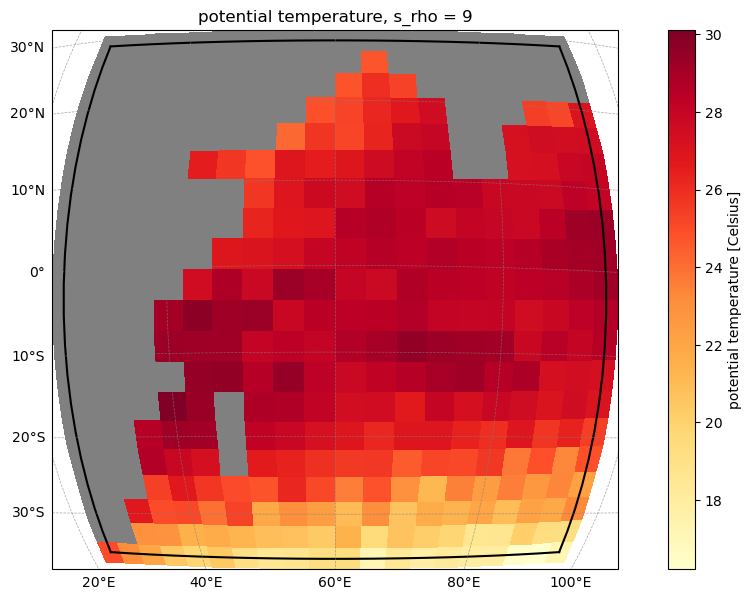
Here we illustrate how you could begin to examine your model output using ROMS-Tools. For this example, we will make a simple plot of the sea surface temperature. Feel free to explore the other variables by examining roms_output.ds, or load some of the other output files in the joined_output directory, to view the BGC variables!
[5]:
from roms_tools import Grid, ROMSOutput
grid = Grid.from_file("~/cstar/wio_toy_blueprint/input/input_datasets/cson_roms-marbl_v0.1_wio-toy_10procs_grid.nc")
roms_output = ROMSOutput(
    grid=grid,
    path=[
        "~/cstar/wio_toy_blueprint/joined_output/output_his.20120101000000.nc",
    ])
roms_output.plot("temp", time=0, s=-1)
OMP: Info #276: omp_set_nested routine deprecated, please use omp_set_max_active_levels instead.
Next Steps#
If you’d like to see C-Star run the same steps but for a different blueprint (pointing to a different area of the globe), feel free to try what you’ve learned, but with the Wales blueprint in this same directory!
If you’d like to try making your own domain and blueprint, consider giving the CSON-Forge repository a try.
If you want to try to orchestrate a set of simulations, try the next tutorial in this repository, the Workplan Tutorial.