⚠️ This project is still in an early phase of development.
The python API is not yet stable, and some aspects of the schema for the blueprint will likely evolve. Therefore whilst you are welcome to try out using the package, we cannot yet guarantee backwards compatibility. We expect to reach a more stable version in 2026.
To see which systems C-Star has been tested on so far, see Supported Systems.
Restarting & continuing a ROMSSimulation#
Contents#
1. Introduction#
In this guide we will:
Take the Simulation we ran for two days (2012-01-01 to 2012-01-03) on the previous page and create a new Simulation that picks up where it ends (
ROMSSimulation.restart())Run this second case with a larger time step for the remainder of the month of January 2012
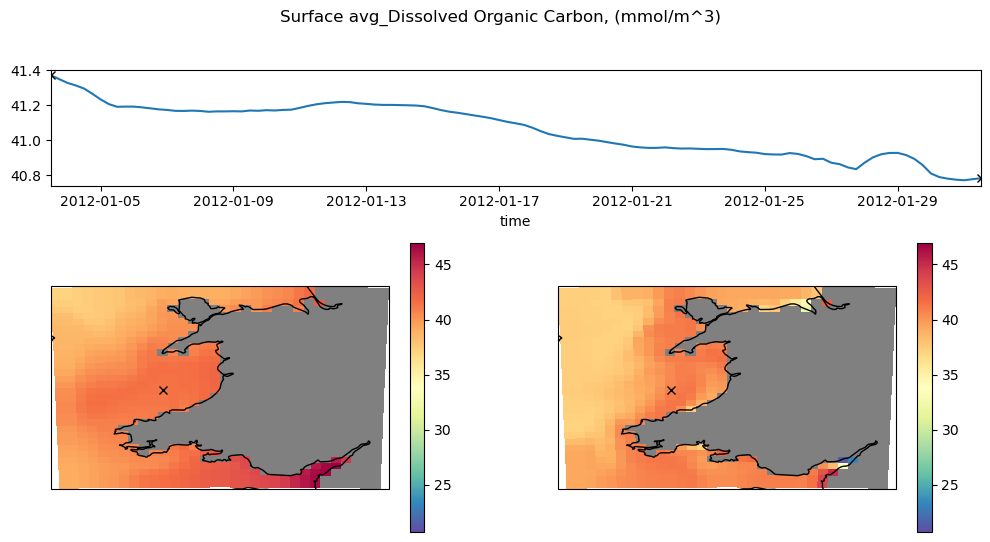
Produce a basic plot of the output
On the previous page, we began this run from a set of prescribed initial conditions and ran it for two days with a short time step of 1 minute. We should now be able to safely restart the model with a slightly larger time step. To do this, we can use the ROMSSimulation.restart() method, which returns a new ROMSSimulation whose start date corresponds to the end date of the Simulation we began with, and whose
initial conditions are replaced with a restart file from our previous run. The directory of the restart will be a subdirectory of the original simulation directory.
2. Restoring and restarting the Simulation#
Restoring#
First, we restore the previously created simulation using ROMSSimulation.restore(). The state of the ROMSSimulation is regularly saved to a file in the directory so it can be restored exactly in a new python session.
[1]:
from cstar.roms import ROMSSimulation
original_simulation = ROMSSimulation.restore(directory = "../../examples/roms_marbl_example_case")
Restarting#
Now, we can create a new ROMSSimulation that picks up where this ROMSSimulation ended using ROMSSimulation.restart(). Some points:
We supply a
new_end_date(the new start date is simply the previous end date)The
directoryof the new, restartedROMSSimulationis automatically generated as a subdirectory of the previousdirectoryThe initial conditions of the new simulation are automatically replaced with a restart file generated by ROMS during the previous run
[2]:
restarted_simulation = original_simulation.restart(new_end_date="2012-01-31 12:00:00")
Taking a look at the simulation, we can see that the initial conditions have been changed:
[3]:
restarted_simulation.initial_conditions
[3]:
ROMSInitialConditions(
location = '/Users/dafyddstephenson/Code/my_c_star/examples/roms_marbl_example_case/output/ROMS_MARBL_rst.20120103120000.nc',
file_hash = None,
start_date = datetime.datetime(2012, 1, 3, 12, 0),
)
Modifying the time step#
If we want to increase the time step for our second run, we will have to manually change the time_step entry under ROMSSimulation.discretization:
[4]:
restarted_simulation
[4]:
ROMSSimulation(
name = roms_marbl_example_cstar_simulation,
directory = /Users/dafyddstephenson/Code/my_c_star/examples/roms_marbl_example_case/RESTART_20120103_120000,
start_date = 2012-01-03 12:00:00,
end_date = 2012-01-31 12:00:00,
valid_start_date = 2012-01-01 12:00:00,
valid_end_date = 2012-01-31 12:00:00,
discretization = ROMSDiscretization(time_step = 60, n_procs_x = 3, n_procs_y = 3),
codebase = <ROMSExternalCodeBase instance>,
runtime_code = <AdditionalCode instance>,
compile_time_code = <AdditionalCode instance>
model_grid = <ROMSModelGrid instance>,
initial_conditions = <ROMSInitialConditions instance>,
tidal_forcing = <ROMSTidalForcing instance>,
river_forcing = <ROMSRiverForcing instance>,
surface_forcing = <list of 2 ROMSSurfaceForcing instances>,
boundary_forcing = <list of 2 ROMSBoundaryForcing instances>,
)
[5]:
restarted_simulation.discretization.time_step = 360
We can now take a look at our ROMSSimulation and see everything is as expected:
[6]:
restarted_simulation
[6]:
ROMSSimulation(
name = roms_marbl_example_cstar_simulation,
directory = /Users/dafyddstephenson/Code/my_c_star/examples/roms_marbl_example_case/RESTART_20120103_120000,
start_date = 2012-01-03 12:00:00,
end_date = 2012-01-31 12:00:00,
valid_start_date = 2012-01-01 12:00:00,
valid_end_date = 2012-01-31 12:00:00,
discretization = ROMSDiscretization(time_step = 360, n_procs_x = 3, n_procs_y = 3),
codebase = <ROMSExternalCodeBase instance>,
runtime_code = <AdditionalCode instance>,
compile_time_code = <AdditionalCode instance>
model_grid = <ROMSModelGrid instance>,
initial_conditions = <ROMSInitialConditions instance>,
tidal_forcing = <ROMSTidalForcing instance>,
river_forcing = <ROMSRiverForcing instance>,
surface_forcing = <list of 2 ROMSSurfaceForcing instances>,
boundary_forcing = <list of 2 ROMSBoundaryForcing instances>,
)
3. Running the restarted Case#
Now we run through the other steps as normal:
[7]:
restarted_simulation.setup()
restarted_simulation.build()
restarted_simulation.pre_run()
[INFO] 🛠️  Configuring ROMSSimulation
[INFO] 🔧 Setting up ROMSExternalCodeBase...
[INFO] ✅ ROMSExternalCodeBase correctly configured. Nothing to be done
[INFO] 🔧 Setting up MARBLExternalCodeBase...
[INFO] ✅ MARBLExternalCodeBase correctly configured. Nothing to be done
[INFO] 📦 Fetching compile-time code...
[INFO] 📦 Fetching runtime code...
[INFO] 📦 Fetching input datasets...
Downloading file 'roms_grd.nc' from 'https://github.com/CWorthy-ocean/cstar_blueprint_roms_marbl_example/raw/netcdf_inputs/input_datasets_netcdf/roms_grd.nc' to '/Users/dafyddstephenson/Code/my_c_star/examples/roms_marbl_example_case/RESTART_20120103_120000/ROMS/input_datasets'.
Downloading file 'roms_tides.nc' from 'https://github.com/CWorthy-ocean/cstar_blueprint_roms_marbl_example/raw/netcdf_inputs/input_datasets_netcdf/roms_tides.nc' to '/Users/dafyddstephenson/Code/my_c_star/examples/roms_marbl_example_case/RESTART_20120103_120000/ROMS/input_datasets'.
Downloading file 'roms_riv_frc.nc' from 'https://github.com/CWorthy-ocean/cstar_blueprint_roms_marbl_example/raw/netcdf_inputs/input_datasets_netcdf/roms_riv_frc.nc' to '/Users/dafyddstephenson/Code/my_c_star/examples/roms_marbl_example_case/RESTART_20120103_120000/ROMS/input_datasets'.
Downloading file 'roms_bry.nc' from 'https://github.com/CWorthy-ocean/cstar_blueprint_roms_marbl_example/raw/netcdf_inputs/input_datasets_netcdf/roms_bry.nc' to '/Users/dafyddstephenson/Code/my_c_star/examples/roms_marbl_example_case/RESTART_20120103_120000/ROMS/input_datasets'.
Downloading file 'roms_bry_bgc.nc' from 'https://github.com/CWorthy-ocean/cstar_blueprint_roms_marbl_example/raw/netcdf_inputs/input_datasets_netcdf/roms_bry_bgc.nc' to '/Users/dafyddstephenson/Code/my_c_star/examples/roms_marbl_example_case/RESTART_20120103_120000/ROMS/input_datasets'.
Downloading file 'roms_frc.nc' from 'https://github.com/CWorthy-ocean/cstar_blueprint_roms_marbl_example/raw/netcdf_inputs/input_datasets_netcdf/roms_frc.nc' to '/Users/dafyddstephenson/Code/my_c_star/examples/roms_marbl_example_case/RESTART_20120103_120000/ROMS/input_datasets'.
Downloading file 'roms_frc_bgc.nc' from 'https://github.com/CWorthy-ocean/cstar_blueprint_roms_marbl_example/raw/netcdf_inputs/input_datasets_netcdf/roms_frc_bgc.nc' to '/Users/dafyddstephenson/Code/my_c_star/examples/roms_marbl_example_case/RESTART_20120103_120000/ROMS/input_datasets'.
[INFO] Partitioning /Users/dafyddstephenson/Code/my_c_star/examples/roms_marbl_example_case/RESTART_20120103_120000/ROMS/input_datasets/ROMS_MARBL_rst.20120103120000.nc into (3,3)
[8]:
simulation_run = restarted_simulation.run()
As on the previous page, we are running this Simulation locally. The call to ROMSSimulation.run() would be different on a supported supercomputing system.
[9]:
simulation_run.status
[9]:
<ExecutionStatus.RUNNING: 3>
Once again, we have to wait for the job to finish before proceeding…
[10]:
simulation_run.status
[10]:
<ExecutionStatus.COMPLETED: 4>
[11]:
restarted_simulation.post_run()
[INFO] Joining netCDF files ROMS_MARBL_rst.20120118120000.*.nc...
[INFO] Joining netCDF files ROMS_MARBL_rst.20120123120000.*.nc...
[INFO] Joining netCDF files ROMS_MARBL_rst.20120110120000.*.nc...
[INFO] Joining netCDF files ROMS_MARBL_rst.20120114120000.*.nc...
[INFO] Joining netCDF files ROMS_MARBL_rst.20120129120000.*.nc...
[INFO] Joining netCDF files ROMS_MARBL_rst.20120116120000.*.nc...
[INFO] Joining netCDF files ROMS_MARBL_rst.20120126120000.*.nc...
[INFO] Joining netCDF files ROMS_MARBL_rst.20120124120000.*.nc...
[INFO] Joining netCDF files ROMS_MARBL_rst.20120120120000.*.nc...
[INFO] Joining netCDF files ROMS_MARBL_rst.20120111120000.*.nc...
[INFO] Joining netCDF files ROMS_MARBL_rst.20120131120000.*.nc...
[INFO] Joining netCDF files ROMS_MARBL_rst.20120117120000.*.nc...
[INFO] Joining netCDF files ROMS_MARBL_rst.20120113120000.*.nc...
[INFO] Joining netCDF files ROMS_MARBL_rst.20120106120000.*.nc...
[INFO] Joining netCDF files ROMS_MARBL_rst.20120115120000.*.nc...
[INFO] Joining netCDF files ROMS_MARBL_rst.20120121120000.*.nc...
[INFO] Joining netCDF files ROMS_MARBL_rst.20120105120000.*.nc...
[INFO] Joining netCDF files ROMS_MARBL_bgc.20120103120000.*.nc...
[INFO] Joining netCDF files ROMS_MARBL_rst.20120127120000.*.nc...
[INFO] Joining netCDF files ROMS_MARBL_bgc_dia.20120103120000.*.nc...
[INFO] Joining netCDF files ROMS_MARBL_rst.20120128120000.*.nc...
[INFO] Joining netCDF files ROMS_MARBL_rst.20120130120000.*.nc...
[INFO] Joining netCDF files ROMS_MARBL_rst.20120119120000.*.nc...
[INFO] Joining netCDF files ROMS_MARBL_rst.20120109120000.*.nc...
[INFO] Joining netCDF files ROMS_MARBL_his.20120103120000.*.nc...
[INFO] Joining netCDF files ROMS_MARBL_rst.20120122120000.*.nc...
[INFO] Joining netCDF files ROMS_MARBL_rst.20120125120000.*.nc...
[INFO] Joining netCDF files ROMS_MARBL_rst.20120104120000.*.nc...
[INFO] Joining netCDF files ROMS_MARBL_rst.20120107120000.*.nc...
[INFO] Joining netCDF files ROMS_MARBL_rst.20120112120000.*.nc...
[INFO] Joining netCDF files ROMS_MARBL_rst.20120108120000.*.nc...
4. Some basic analysis of the output#
Now we’ve finished running the model, we have a month of output to take a look at.
C-Star doesn’t currently support plots of model data, so we will have to manually produce plots from the model files. Don’t worry too much about understanding the model’s naming conventions in this code cell (C-Star will usually take care of these things for you) - this is just a visual demonstration!
[13]:
%matplotlib inline
[14]:
import numpy as np
import xarray as xr
import cartopy.crs as ccrs
import datetime as dt
import cartopy.feature as cfeature

bgc_ds = xr.open_dataset(restarted_simulation.directory / 'output/ROMS_MARBL_bgc.20120103120000.nc') # this contains 6-hourly data, with the date in the filename reflecting the first time entry
grd_ds = xr.open_dataset(restarted_simulation.directory / 'ROMS/input_datasets/roms_grd.nc')
lon,lat=grd_ds.lon_rho,grd_ds.lat_rho
output_time=[dt.datetime(2000,1,1)+dt.timedelta(seconds=t) for t in bgc_ds.ocean_time.values]

var = 'DOC'
i_idx = 10
j_idx = 15
k_idx = 19
t_idx = [0,-1]

plot_data = bgc_ds[var].where(grd_ds.mask_rho).isel(s_rho=k_idx)

%matplotlib inline
import matplotlib.pyplot as plt
from matplotlib.gridspec import GridSpec


fig = plt.figure()
cmap=plt.get_cmap('Spectral_r')
cmap.set_bad('grey')

gs = GridSpec(3, 2, figure=fig, hspace=0.5)

# time series
ax1 = fig.add_subplot(gs[0, :])

ax1.plot(output_time,plot_data[:,j_idx,i_idx])
ax1.set_xlim(output_time[0],output_time[-1])
ax1.set_xlabel('time')
ax1.plot(output_time[t_idx[0]],plot_data[t_idx[0],j_idx,i_idx],'kx')
ax1.plot(output_time[t_idx[-1]],plot_data[t_idx[-1],j_idx,i_idx],'kx')


# Maps
ax2 = fig.add_subplot(gs[1:, 0],projection=ccrs.PlateCarree())
ax3 = fig.add_subplot(gs[1:, 1],projection=ccrs.PlateCarree())

VMIN = np.min(plot_data.values[plot_data.values > 0])
VMAX = np.max(plot_data.values[plot_data.values > 0])

p2 = ax2.pcolormesh(lon,lat,plot_data.isel(time=0).values, vmin=VMIN, vmax=VMAX, cmap=cmap)
p3 = ax3.pcolormesh(lon,lat,plot_data.isel(time=-1).values, vmin=VMIN, vmax=VMAX, cmap=cmap)
[a.set_xticks([]) for a in [ax2, ax3]]
[a.set_yticks([]) for a in [ax2, ax3]]

ax2.set_title("")
ax2.plot(lon[j_idx,i_idx].values-360, lat[j_idx,i_idx].values, 'kx')
ax3.plot(lon[j_idx,i_idx].values-360, lat[j_idx,i_idx].values, 'kx')

[a.add_feature(cfeature.COASTLINE, linewidth=1) for a in [ax3,ax2]]
fig.colorbar(p2, ax=ax2)
fig.colorbar(p3, ax=ax3)

fig.suptitle(f'Surface {bgc_ds[var].long_name}, ({bgc_ds[var].units})')
fig.set_size_inches(12,6)
grd_ds.close()