Attention
This project is still in an early phase of development.
The python API is not yet stable, and some aspects of the schema for the blueprint and workplan will likely evolve. Therefore whilst you are welcome to try out using the package, we cannot yet guarantee backwards compatibility. We expect to reach a more stable version in 2026.
Terminology and Concepts#
Definitions#
- Application#
An application is a piece of software we want to run.
Currently, the only supported application is ROMS-MARBL. Future applications will support domain generation and post-processing.
- Blueprint#
A blueprint contains all of the information needed to run a specific application, such as:
location of application code
definitions of input data sources
user-configurable parameters
Blueprint content varies based on the needs of the target application.
See also
Blueprints can be created in code or as YAML files executed using the C-Star CLI.
See the blueprints page for examples and more info.
- Workplan#
A workplan defines a collection of steps to be executed. Each step is a logical unit of work referencing a blueprint.
A workplan can define dependencies for a step. As a result:
a step will not be executed unless all of its dependencies have completed successfully
any steps that are not waiting on a dependency may be executed simultaneously
In future releases, workplans may be designated as “validated.” Customization of validated workplans will be restricted to ensure reproducibility and auditability.
See also
Workplans can be created in code or as YAML files executed using the C-Star CLI.
See the workplans page for more examples and more info.
- Orchestrator#
The orchestrator oversees the execution of workplans. It creates a DAG (directed acyclic graph) of tasks, schedules their execution, and monitors their status. The orchestrator is ephemeral and can be stopped and restarted without loss of state.
It typically runs as a process on an HPC login node and submits workloads to appropriate compute resources using a Launcher.
- Run ID#
A run ID is a unique identifier for a given execution of a workplan. Users specify the run ID when submitting a workplan to the orchestrator.
The run ID can be used to:
check the status of a previously submitted workplan
re-start a workplan that has failed or been cancelled
locate output data generated by a workplan
Executing a workplan with a new run ID results in a new instantiaiation of that workplan.
- Worker#
The worker is a host application responsible for the execution of a blueprint. It reads a single blueprint and parameterizes the execution of an application as specified in the blueprint.
It typically runs as a process on a compute resource.
Example HPC Deployment#
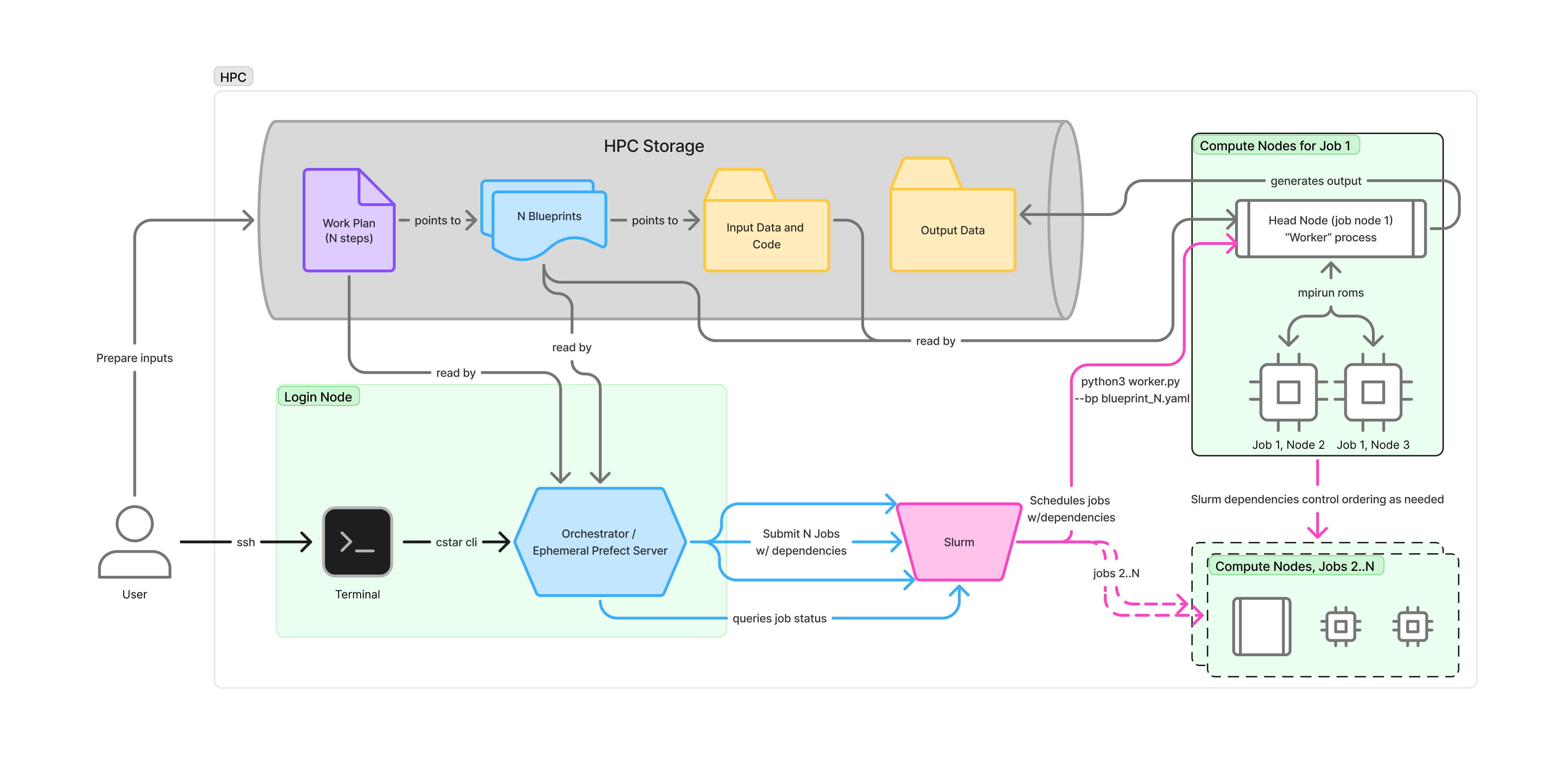
This diagram illustrates a user-initiated workflow on a HPC. It assumes that the user has already prepared their blueprints and a workplan, with all relevant input data in their HPC storage. An example roms-marbl blueprint would specify the location of compile-time files, run-time files, and input data files such as surface forcing, initial conditions, etc. Again, see blueprints page for an example. In this example, the user has already generated the aforementioned files and the blueprint points to them.
The user logs into the login node and initiate the workplan via the cstar cli. This creates an orchestrator instance (an ephemeral prefect server) that reads their workplan, identifies the tasks that need to be executed, organizes per-task blueprints, and submits the entire set of tasks to SLURM.
SLURM allocates the requested compute resources, schedules jobs, enforces dependencies, and monitors job status. Each task gets its own allocation and initiates a worker to read the blueprint for that task and executes the appropriate application.
The user can log off and return later to monitor the overall workplan status by re-calling the cstar cli with the same run ID.